You’ve might worked hard to attract visitors to your eCommerce website and put a lot of time and money into creating and developing your products, but if those visitors don’t make it through your checkout process to finalize the purchase, none of those things really matters. Your success rises and falls on how many sales you make, not barely on how many people you can attract to your site. Unfortunately, most eCommerce websites don’t do checkout very well.
Checkout page is the most important part of your website as this is where prospects become customers, and it’s where you make money. Also, it is a frequently overlooked area for webstore owners looking for ways to increase online revenue and conversion. Achieving the best checkout page requires testing and optimization to hit your desired conversion rates and ensure your customers complete their transactions. Some eCommerce businesses excel at checkout page while others overlook the functionality of this all-importance page.
Why do you need to optimize your checkout page?
While you may think a single page can’t cost your site that much money, you’d be surprised by how much a poorly-done checkout page could harm your conversions. Do you know why are you losing customers at your checkout page? Shopping cart abandonment is a big issue for eCommerce store owners because it can costs hundreds of billions of dollars in lost sales.
Tweaking your checkout page to better fit the needs of your business, and customers, can have a significant impact on your revenue that will therefore increase your sales conversion rate in the long run. Fortunately, simply by tweaking a few small details in your checkout process, you can improve your conversion rate by a whopping 35.26%. But, how can we do that?
Best Checkout Page Optimization Strategies
Now that you’re crystal-clear on exactly how important your checkout page design is, let’s go straight to the best checkout page strategies to optimize your checkout page for higher conversion rates.
- Keep process quick and simple
With each field you add to your checkout page you’re increasing the amount of time it takes a customer to give you money. Plenty of conversion studies have shown that the less clicks to checkout there are, the higher your conversion rate will be. With the cart and basket pages, the key is to keep things as simple as possible. Only include custom fields that are absolutely necessary, since these naturally provide more shopper friction.
The email address should be one of the first pieces of information collected. By collecting the email address first, you’re able to target customers later if their cart is abandoned. Only show fields that are absolutely required. Keeping your checkout form simple and free of clutter is an easy way to put your customers at ease while they breeze through the checkout process.
- Remove page distractions
Keep in mind in order to be effective, your checkout page has to be laser-focused and straightforward. The goal of your checkout page is to get your customer to complete their purchase. This means you should only have one Call To Action (CTA) prompting your customer to make a purchase. You can replace or minimize the header and footer, in order to prevent any distractions for the user. The focus of the checkout page should be — well, the checkout page.
- Display trust signals
When a visitor is shopping on your site, and providing private information, they want to feel safe. A secure site not only puts your customers at ease; it can also help you convert more visitors into customers. Baymard says that around 19% of visitors abandon checkout page because they don’t trust sites with their payment information.
Don’t forget to include credit card logos and security seals. Trusted payment logos and trust badges / seals (if applicable) should be displayed prominently on your checkout page, along with accepted forms of payment. Displaying these images to your customers will increase their sense of security and trust in your site. Let shoppers know your site is a secure, trusted place to do business. Also, if you offer a money back guarantee or some important notes you want to tell your customers, be sure to add those in the checkout page as well.
- Make checkout mobile friendly
There is a possibility that your E-commerce website is responsive but is your checkout page optimized for mobile users? Stats show that 74% of mobile users are more likely to revisit your site in future if your site works well on mobile phone. Mobile optimization for checkout page is a must to improve sales and conversion rates.
A fast, simple checkout will be significantly easier to use on mobile devices. Remember that more and more transactions are taking place on mobile devices, and a clunky mobile checkout might send a potential customer off to a competitor’s site.
- Improve site loading times
Do you know that increasing the number of components on your checkout page will result in increased load times and reduced customer satisfaction? 59% of people will abandon a webpage if it doesn’t load within 3 seconds. Make sure to eliminate distraction by removing unnecessary features from your checkout page, and stick to the basics.
Stress test important pages on your site as much as possible to know how they work under extreme conditions, and investigate Google PageSpeed Modules or other tools to speed up load times.
- Include multiple payment options
Offering multiple payment options is one of the best ways to keep these visitors shopping. 8% of people abandon the checkout page because they can’t find the payment option they want. And another 4% leave if their credit card is declined.
Offering multiple payment methods makes this easier for the customer, as they can choose the payment method they’re most comfortable with to overcome purchasing objections. Offering as many payment methods as you’re comfortable can drive additional conversions by ensuring your customers pay with the method of their choice. The preferred payment options are by credit card (42%) followed by PayPal (39%).
- Guest Checkout
In the Baymard research, 37% of shoppers abandoned carts because they had to create an account to shop. That’s a huge number of potential customers to lose. Some of your customers will be hesistant to create an account with your store upon checkout — registration forms such as this can be very time-consuming and tiring to fill out, and they create mental tension by requiring another “decision” during checkout.
Anonymous checkouts are especially important for first-time customers. Forcing users to sign up for an account on the website before they reach the checkout page has been shown to decrease conversion rates. To solve this problem and make things easier for your customers is by introducing a guest checkout or including social login to make signup easy.
- Offer Up-sells and Cross-sells
These are sales techniques we can also add on our checkout page to optimize sales conversion. Cross-selling pitches products in addition to what the customer is already interested in, and upselling suggests a more expensive version of the product. The idea is to make the customer spend more money they originally thought they’d spend. These are great, and have always done the trick when trying to increase online sales. You can check this article to learn more about Up-sells and Cross-sells.
Plugins for Better Checkout Process
Booster for WooCommerce

Booster for WooCommerce is a WordPress WooCommerce plugin that supercharges your site with awesome powerful features. More than hundred modules. All in one plugin. Features are absolutely required for anyone using excellent WooCommerce platform. Booster for WooCommerce
WooCommerce Custom Tables
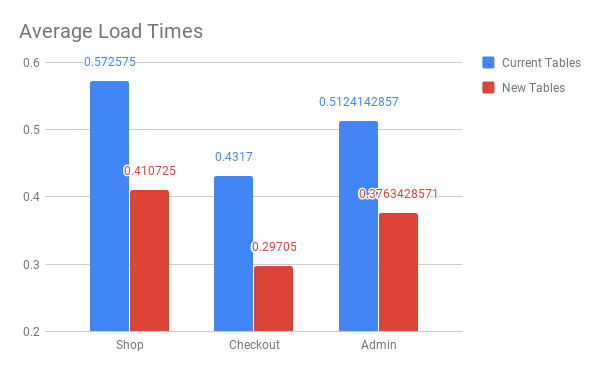
WooCommerce 3.0 introduced the notion of CRUD (Create, Read, Update, and Delete) interfaces in a move to unify the way WooCommerce data is stored and retrieved. However, orders are still stored as custom post types within WordPress, with each piece of order information (billing address, shipping address, taxes, totals, and more) being stored in post meta. In fact, WooCommerce will typically create over 40 separate post meta entries for every single order. If your store receives even 10 orders a day, that means 400 new rows in the table every single day! The larger the post meta table grows, the longer queries will take to execute, potentially slowing down queries (and thus page load times) for you and your visitors. WooCommerce Custom Orders Table uses the WooCommerce CRUD design to save order data into a single, flat table that’s optimized for WooCommerce queries; one order means only one new row, with minimal performance impact.
WooCommerce Quick Speed Tips
All in all, your eCommerce checkout page is the most important part of your online store. You cannot win sales and grow your business if you cannot get consumers to convert. A smooth checkout flow can increase profits for your online business and can improve cart abandonment rates. Optimizing your checkout process will help increase revenue, and customer satisfaction. Conversion rate optimization is an ongoing process. Develop ideas, make a change, test to see how it affects sales. I admit, there are other ways, too. But, it’s a guarantee that these steps will help you stay on the right track.
1. Increase WordPress Memory Limit
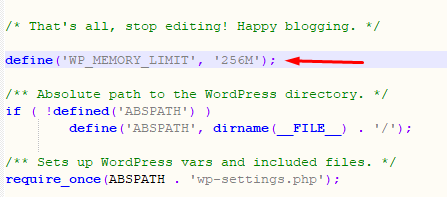
Once the store is live, the first thing you need to do is to go to wp-config.php, located in the WordPress root folder. At the very end of the file, right after the line that says, “Happy Blogging”, add the following line:
define(‘WP_MEMORY_LIMIT’, ‘256M’);
Edit the PHP.ini file
If you have access to the php.ini file, edit the maximum allowed memory limit. For instance, if the line shows 64M, change it to 256M.
memory_limit = 256M ; Maximum amount of memory a script may consume (64MB)
Edit .htaccess file
If you couldn’t access php.ini, access the .htaccess file and paste the following code in it:
php_value memory_limit 256M
This is one of the most effective WooCommerce speed optimization techniques.
2. Optimize Images To Speed Up WooCommerce
In this age of visual marketing, images from the core of the design of WooCommerce stores. However, many store owners make the mistake of using unoptimized images that severely impact the performance of the store and is one of the most effective ways to speed up WooCommerce sites.
Large image files slow down the user experience of the store. In addition, the slow page load speed (a direct result of using huge image files) means that search engines downrank the store in SERP.
To deal with this situation, a good practice is to reduce the size of the images through plugins such as WP-Smush.it, EWWW Image Optimizer or Hammy. These plugins reduce the size of the images without compromising the quality of the images and play a big role in WooCommerce speed optimization.
3. Use a Cache Plugin
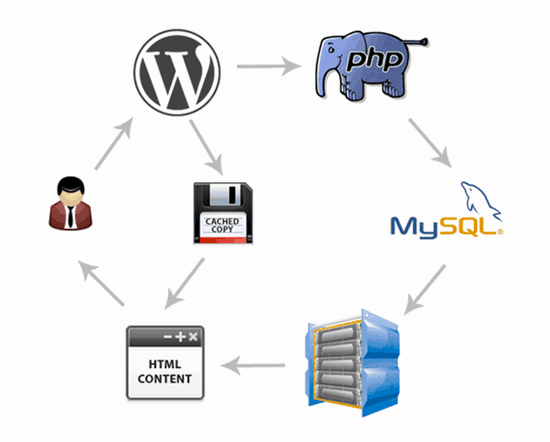
Caching basically allows you to speed up WooCommerce site by storing a copy of the resources of the store. This way, the visitors experience fast page load speed because the WooCommerce doesn’t waste time by getting the resources (CSS, JS and other files). Instead, it serves the caches version directly to the visitor. As a result, static pages are rendered almost instantaneously while dynamic pages take less time to display the content to the visitors.
WordPress offers a great selection of caching plugins such as Breeze, W3 Total Cache, WP Rocket, WP Super Cache, etc. Of these, I prefer Breeze WordPress Cache plugin because of its simple and easy operation.
4. Use Varnish Cache
Varnish cache allows WooCommerce stores to speed up user experience by storing a copy of all the resources of the store. In response to the visitor’s request, the cache serves the stores data. The good news is that Varnish compatible WooCommerce hosting such as Cloudways allows you to launch Varnish compatible WooCommerce stores on top of reliable cloud infrastructure providers.
5. Use a Content Delivery Network (CDN)
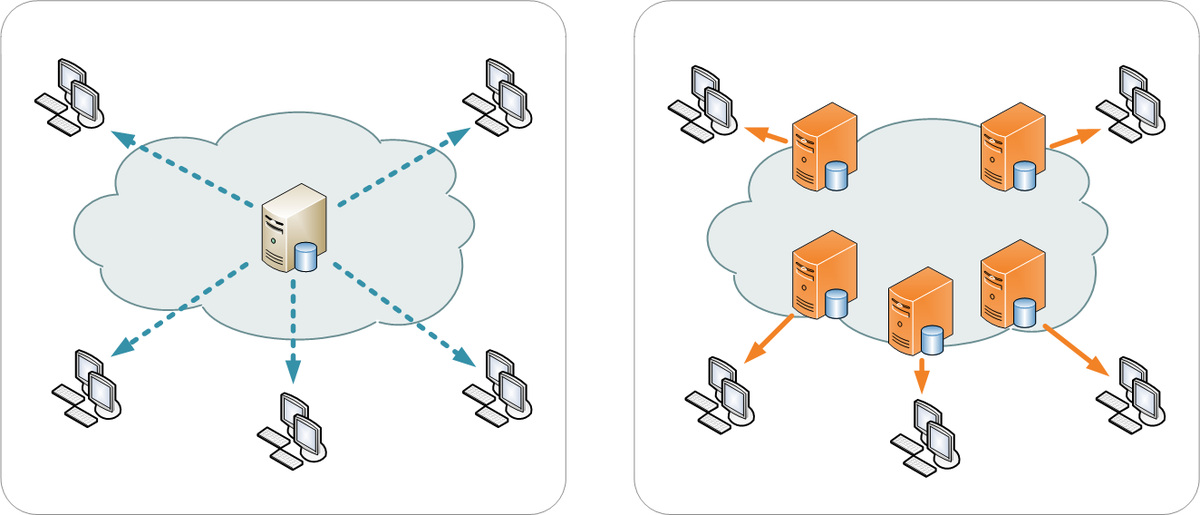
A CDN service speeds up your store load speed by serving cached static content from servers located near the users’ geographic location. Popular CDN options include MaxCDN, Sucuri, Cloudflare, StackPath, KeyCDN,Cloudways CDN, etc.
Speeding up your ecommerce store should be on the top of your priority list. The tactics I have mentioned in this article will have you improve load times on your online store that will enhance user experience and improve WooCommerce speed optimization. If I have missed out on anything, let me know in the comments.
6. Get a Faster WordPress Hosting Provider
It’s common knowledge that a fast and reliable WordPress hosting improves your site speed dramatically. A WooCommerce store needs a hosting provider that offers maximum uptime without any interruptions. What makes a fast hosting even more important for an ecommerce store is that fact that there are multiple traffic spikes based on deals, offers and different seasons. You would want your hosting provider to handle the sudden spike and not impact the load time of your WooCommerce store.
Conclusion: Increase your Sales Conversion Rate!
All in all, your eCommerce checkout page is the most important part of your online store. You cannot win sales and grow your business if you cannot get consumers to convert. A smooth checkout flow can increase profits for your online business and can improve cart abandonment rates. Optimizing your checkout process will help increase revenue, and customer satisfaction. Conversion rate optimization is an ongoing process. Develop ideas, make a change, test to see how it affects sales. I admit, there are other ways, too. But, it’s a guarantee that these steps will help you stay on the right track.